Friday, June 26, 2015

Easier Remote Access for Clinical Key


Clinical Key just made it easier to sign up for Remote Access.  With this simple registration, you'll be able to access Clinical Key from home, an internet cafĂ©, or anywhere you have internet access.

Below are the steps with screen shots for 2 scenarios :
A) If you already set up a Clinical Key personal account/user profile, or
B) If you have not yet registered for a Clinical Key personal account.

*  If you have previously registered for Clinical Key remote access using a registration ID and password, there is no need to register again.

A) If You Already Have a Clinical Key Personal Account/User Profile:
1. To activate remote access, click Login at the top of ClinicalKey.
From the Login page, click the link under Remote Access Activation.

2. From the Login page, click the link under Remote Access Activation.


3. Enter the email address associated with user profile and click Continue. 
ClinicalKey displays an activation message and sends a confirmation email.

4. After entering your email address into the Remote Access Activation registration bar and click continue, you will receive a confirmation email.  You will need to click the link within the email to officially start your remote access. 
  • This will grant 180 days of remote access. 
  •  Prior to the end of the 180 days, you will need to log into their ClinicalKey personal account/user profile while on your institution’s IP.  This will extend your access another 180 days. 
  • Should their remote access expire, you will need to follow the above steps to re-activate remote access.


B. If you Do NOT Have Personal Account/User Profile:
1. Go to www.ClinicalKey.com and click Register in the top right corner.

2. Using the email address associated with your institution (ie, your work email : such as name@affinityhealth.org OR name@ministryhealth.org), fill in the required information on the registration page.  Please note : Free emails like gmail, yahoo, and hotmail will not be accepted for remote access.  
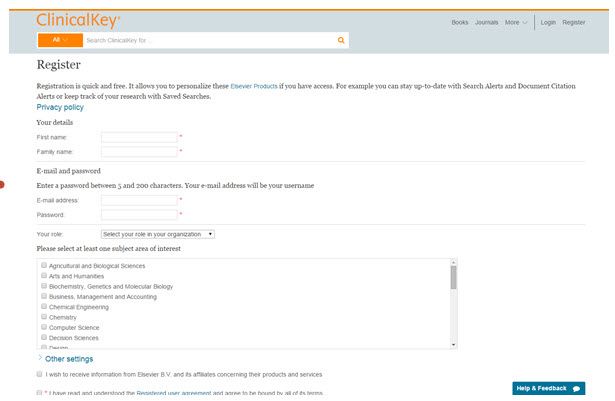
3. Click Register when finished. ClinicalKey will display an activation message and send a confirmation email.
4. In the Confirmation email, click the link to officially start your remote access to Clinical Key.
  • This will grant 180 days of remote access.
  • Prior to the end of the 180 days, you will need to log into your ClinicalKey personal account/user profile while on your institution’s IP. This will extend your access another 180 days.
  • Should your remote access expire, you will need to follow the above steps to re-activate your remote access.
For additional articles and tutorials, visit our Clinical Key Support Page.

For help with registrations, or other questions, contact Your Ministry Librarians :
Michele Matucheski      920-223-0340                                     

Deb Knippel     715-346-5091

The Patient Experience Team Tool Kits


These tool kits were created by The Patient Experience Team to help our Associates create a consistent and positive patient experience across Ministry Health Care.   These tool kits help share best practices and tools for launching these initiatives at your site.

Patient Experience Tool Kits

You can also get their through the Source
The Source > Links & Resources > 
>In the Ministry Search Box on the left side, search for “patient experience”
Click on Patient Experience  > Tool Kit Site (link to LibGuide)

This tutorial provides screenshots for getting to The Patient Experience Tool Kits.

At present, you’ll find completed tool kits for :
o   Bedside Shift Report
o   Hourly Rounding

New tool kits will come online in the coming months, including AIDET, TeachBack, and others. 

Resources for each Tool Kit include :
o   Contact info for the subject matter expert
o   Research articles and evidence to support the strategy
o   The Tools – which may include PowerPoints, worksheets, metrics, staff education, competencies, etc.
o   Recommended Reading
o   CBT Courses in Learning Solutions / Pathlore
o   Web Video Demonstrations

Thursday, June 25, 2015

Screenshots for Getting to MyCommunities at AscensionHealth


www.MyAscensionHealth.org helps to connect Ministry Health Care with Leaders and Associates from Ascension's Health Ministries across the US.  This connection encourages learning and sharing of best practices.

  • See what your peers around Ascension have done to improve patient care, and quality.  
  • Share best practices
  • Why re-create the wheel, when someone else may have already done it?


This tutorial provides screenshots for getting to and searching the thousands of documents on Ascension's MyCommunities.

Tuesday, June 2, 2015

The Clinical Reference Tools for Providers LibGuide : A Sandwich Seminar with Library Services June 5


Learn how the Clinical Reference Tools for Providers LibGuide can make your work life easier and smarter in this WebEx session available to all Ministry Associates and Providers.  

Clinical Reference Tools for Providers : Sandwich Seminar
Friday, June 5, 2015   12 noon     Link to Recorded WebEx.
Expected duration : 23 minutes


With the ClinicalReference Tools for Providers LibGuide, we’ve pulled together the most useful resources that a busy health care provider might need to look up info for direct patient care.   
This customizes the Library pages for Providers.

The landing page provides easy access to :
                Clincial Key (with FirstConsult and Procedures Consult)
                Nursing Reference Center
    Access Medicine
                Harrison’s Online
    PubMed / Medline
                Medscape
                National Guideline Clearinghouse, and more …

The tabs across the top lead to more tools for :
                Drug Info
                Diagnosis
                Patient Education

How to get there :
The Source  > Links & Resources > Library
                Clinical Reference Tools ( Under Most Popular)

                Direct url : http://ministryhealth.libguides.com/clinicalreference

This session will be recorded and made  available on the Clinical Reference Tools Page.

Questions or comments?  Please contact your Librarian,  Michele Matucheski.

Thursday, May 28, 2015

Links & Citations in Nursing Reference Center (NRC) – A Tutorial


People often ask me how to get a permalink and/or citations for documents in Nursing Reference Center.    This question comes up regularly when people want to :
  • share NRC documents
  • cite them in policies / procedures
  • cite them in papers or
  • CBTs
  • or other venues
  • or go back to them later
Unfortunately, people soon discover the url harvested from the browser location box times out and leads to an error message after a few short hours.  This tutorial on getting permalinks and citations in NRC should simplify the process, and save you time and frustration.

This tutorial is also included on our  NRC Support Page  (if you need it in future) along with other helpful tips for using NRC.

Questions or comments?
Contact your Librarians :

Michele Matucheski  (920-223-0340)  or Deb Knippel (715-346-5091)

Thursday, April 30, 2015

Cochrane Clinical Answers


Introducing a new tool for evidence-based practice: Cochrane Clinical Answers.                                      Real PICO questions with best-evidence answers culled from The Cochrane Library.

Cochrane Clinical Answers (CCA)                             The Cochrane Library

Where to Access : Cochrane Clinical Answers (CCA) can be found on the following pages:

Get practical evidence for healthcare decision-making with Cochrane Clinical Answers, a new physician-focused resource from the Cochrane Library. Based on the high-quality evidence of Cochrane systematic reviews, this clinical support tool provides evidence-based answers when and where you need them most, making it easy to find authoritative answers to your clinical questions. 

Cochrane Clinical Answers focuses on important patient-centered outcomes, enabling you to apply the results of Cochrane reviews in practice.

Cochrane Clinical Answers (CCAs) provide a readable, digestible, clinically focused entry point to rigorous research from Cochrane systematic reviews.  CCAs are designed to be actionable and to inform decision making at the point of care. Each Cochrane Clinical Answer contains a clinical question, a short answer, and an opportunity to ‘drill down’ to the evidence from relevant Cochrane reviews.  Evidence is displayed in a user friendly format, mixing narrative, numbers and graphics.

Target Audience :  Physicians, Healthcare practitioners and professionals, and other informed health care decision-makers.  

Cochrane Clinical Answers are developed using a rigorous process, ensuring that the information you access reflects the latest research. New questions are continually added to ensure broad coverage across a range of medical topics. This evidence-based resource is designed for access at the point of care, providing you with the highest-quality research for use in your daily practice.

Questions or Comments?
Contact Your Librarians,

Deb Knippel and Michele Matucheski 

Friday, April 10, 2015

Sandwich Seminars with Library Services : Spring 2015 Schedule


Ministry Library Services will be offering the following  brief training sessions via WebEx. 
All Ministry Associates, Providers, and Medical Staff are welcome to attend.
Grab your lunch, tune in and join us for the upcoming sessions.

This sessions will be recorded and made available on our Search Tips & Tutorials LibGuide  where you can find additional training videos, handouts, and other support materials. 
Introduction to Clinical Key
Friday  April 17, 2015   7:15 am       Link to Recorded WebEx
Lead by Deb Knippel
Expected duration : 15-20 minutes

Intro to / Review of Nursing Reference Center
Friday April 17, 2015   12 noon   Link to Recorded WebEx
Lead by Michele Matucheski
Expected duration : 20 -25 minutes

Natural Standard / Natural Medicines
Wednesday April 29, 2015    12 noon.  
Lead by Deb Knippel
Expected duration : 15-20 minutes

Review of Library Services
Tuesday  May 5, 2015     12 noon  Register.    Link to Recorded WebEx
Lead by Deb Knippel
Expected duration : 15-20 minutes

Clinical Reference Tools for Providers
Friday June 5, 2015  12 noon   Register.      Link to Recorded WebEx
Lead by Michele Matucheski
Expected duration : 15-20 minutes


Questions or comments?  Please contact your Librarians,  Michele Matucheski or Deb Knippel.

Tuesday, March 31, 2015

Affinity Library Intranet Page to be retired April 30, 2015 : Use the Ministry Library without Walls Instead


The old Affinity Library Intranet Page will be retired April 30, 2015. 

Why the change?
  • EM3, the content management system that Affinity has used for years is no longer being supported by its creators, and has been increasingly “unstable.”
  • Since the merger with Ministry Health Care in 2012, we’ve been working behind the scenes to make sure we offer the SAME library resources  throughout  Ministry and Affinity.   Over the last few years, we’ve slowly been making changes “under the hood” to codify and unify Library offerings.  You may already be using some of our new LibGuide pages.
  • This fits into the idea of One Ministry with one Library Services Department to serve the whole system of Ministry Health Care (including Affinity). 
  •  Rest assured : You’ll still be able to access your favorite Library resources (Nursing Reference Center, Clinical Key, Access Medicine, Nursing Standards LibGuide, your favorite eJournals, and more …).
  • Additionally, your Librarians will still be available to support the work you do by providing articles, and full-text access, research, and training—as usual.
  • The physical library at Mercy Medical Center in Oshkosh remains  The Resource Library for ALL of Ministry Health Care, with Michele Matucheski as your Librarian.    Only the intranet website is changing. 

What to use instead?
·          Use the Ministry Library without Walls as the Library Intranet  Home Page.
·         


How to get there?
·         The Source > Links and Resources > Search for Library > Click on “Library without Walls”
·      

Handy Tip :  Why not add the Library without Walls to your favorite links in The Source?
Questions or comments?  Please contact your Librarian,  Michele Matucheski.


Friday, March 27, 2015

Introducing The Clinical Reference Tools for Providers LibGuide


With the Clinical Reference Tools for Providers LibGuide, we’ve pulled together everything a busy health care provider might need to look up info for patient care. 

The landing page provides easy access to :
Clinical Key (with FirstConsult and ProceduresConsult)
Nursing Reference Center
Access Medicine
Harrison’s Online
PubMed/ Medline
Medscape
National Guideline Clearinghouse, and more …

The tabs across the top lead to more tools for :
Drug Information
Diagnosis
Find Books / eBooks
Journals Title Search
Patient Education

How to get there :
The Source > Links & Resources > Library >
Clinical Reference Tools (Under Most Popular)

Clinical Reference Tools for Providers LibGuide 
Direct url :   http://ministryhealth.libguides.com/clinicalreference

Clinical Reference Tools for Providers : A Sandwich Seminar with Library Services
Friday June 5, 2015  12 noon   Register.  
Lead by Michele Matucheski
Expected duration : 15-20 minutes

Add it to Your Favorite Links in The Source for easy access!

Do you have other suggestions for what you’d like to see on this LibGuide? 
Let me know :


Michele Matucheski    920-223-0340  mmatuche@affinityhealth.org

Tuesday, March 3, 2015

Introduction to Nursing Reference Center : A Sandwich Seminar with Library Services


Nursing Reference Center (NRC) is a point-of-care reference tool designed especially for Nurses, but it is also offers relevant info for many other professions, such as pharmacy and rehab.   

Nursing Reference Center content includes :
·         Quick Lessons on Health Conditions and Diseases
·         Evidence-Based Care Sheets
·         Drug Information
·         Skills/Procedures
·         Skill Competency Checklists
·         Continuing Education Modules
·         Patient Education Handouts
·         Best Practice Guidelines
·         Point-of-Care Reference Books
·         and Full-Text Journal Articles

Learn how Nursing Reference Center can make your work life easier and smarter in this WebEx session available to all Ministry Nurses, Providers, and Associates.


Introduction to Nursing Reference Center : Sandwich Seminar
Friday, April 17, 2015   12 noon             Watch the Recorded WebEx.
Expected duration : 20-25 minutes

This session will be recorded and made  available on our Nursing Reference Center Support Page, where you can find additional training videos, handouts, and support materials. 


Alternatively, you can watch a previously recorded WebEx session through Pathlore/iLearn and have it appear on your transcript :   

Course:  Introduction to Nursing Reference Center (NRC) CBT
Code: SDPZ100AC
Course Type: Class Recorded for Online CBT

Questions or comments?  Please contact your Librarian,  Michele Matucheski.

Visit The Library without Walls and our Clinical Reference Tools Page.